Turn your CS2.demo
into cheating evidence.

FlickProof gives you a written report with evidence for every round, including video clips.
0% false positivesNot one of 2,991 individual plays from LAN tournaments was called a cheater.
1 demo every week for free · no card needed
The report is written for you
Skip the half hour of scrubbing through the demo and typing out rounds. Every flagged player gets a ready-to-send report: copy it once, paste it into the report form on FACEIT, Steam or your league.
- What gave them away, in plain sentences an admin reads in seconds.
- Every flagged round, with the enemy it happened on.
- A link to the clip of each round, so the admin watches the proof.
Report Cheater
Paste it into the platform's cheat report. Click the text to copy it.
CS2 demo review that finds cheaters and shows you the clips
FlickProof is a CS2 anti-cheat demo review service. You upload a Counter-Strike 2 match demo (a .dem file from Premier, Competitive, FACEIT or any other server) and FlickProof analyses every player in the match, tick by tick. It looks for the traces cheats leave in a demo, scores each player, and renders video clips of the exact moments that gave them away, so you can see the evidence with your own eyes.
VAC and in-game reports work on their own schedule and never show you anything. FlickProof answers the question you actually have after a strange match: was that player cheating, and where is the proof? You get a per-player verdict, the rounds behind it, and clips you can watch, download and share. The free plan includes 1 demo every week, no card needed.
What FlickProof detects in a CS2 demo
- Aimbot and aim assist
- Wallhack and ESP
- Triggerbot and reaction cheats
- Recoil scripts and spray control
- Movement cheats
How it works
Sign in with Steam
Your Steam account is your login. There is no password to create.
Upload a demo
Add the
.demfile of a match you played (compressed is fine), or let FlickProof fetch it:- Upload a .dem fileAlways
- FACEIT matchesComing soon
- Valve Premier & CompetitiveAutomatic
Watch the proof
Each player gets a score and an Aim, Awareness and Reaction reading, with the rounds where cheating showed and video clips you can watch, download and share.
What you get
We check everyone
Not just you. We look at every player in the match.
A score for each player
Each player gets a score from 0 to 100%. The higher it is, the more they look like a cheater. We also tell you how: their aim, seeing through walls, or reacting too fast.
The rounds that look wrong
We show you the rounds where something looked wrong. Click a player to see every round they played.
A report, ready to send
Press Copy and your report is done. Paste it into FACEIT or Steam. Each round comes with a link to its video.
Videos you can watch
We cut the strange moments into short videos. You can also make a video of any round you want.
- Round 9score 18.6
- Round 14score 15.1
- Round 21score 12.9
Watch first
Very good players can look like cheaters, and some cheaters hide well. So always watch the videos before you report someone. And please never use a score to be mean to anyone.
Watch the clips side by side
Open any flagged round and the clip plays large, with what the signal measured under it and every other clip of that player beside it.
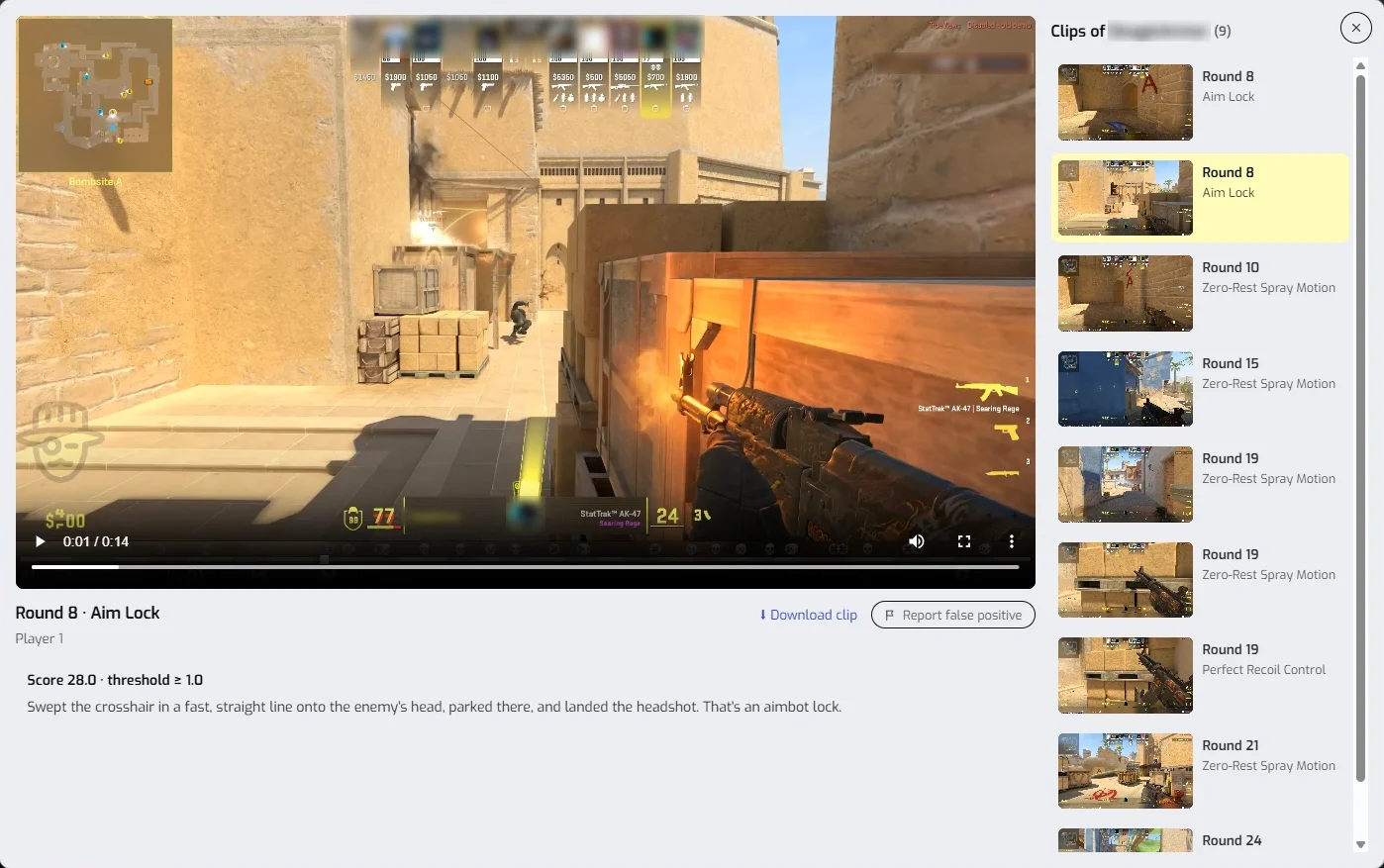
Make your own clips
Not only the flagged moments: open any player from the match and render a clip of any kill or any whole round, then watch, download or share it.
Pricing
Start free, and upgrade from your account page when you need more. Compare the plans
Free
Try it on a match that bothered you.
- 1 demo every week
- Matches you played in
- Full analysis: every signal, every clip
- Make up to 2 minutes of your own clips from each demo
Casual
$7 / monthor $67.20 / yearFor checking the odd match that felt wrong.
- 2 demos every day
- Matches you played in
- Full analysis: every signal, every clip
- Make up to 2 minutes of your own clips from each demo
Regular
$13 / monthor $124.80 / yearFor players who review most of the matches they play.
- 4 demos every day
- Matches you played in
- Full analysis: every signal, every clip
- Make up to 2 minutes of your own clips from each demo
GrinderAny match
$30 / monthor $288 / yearFor grinders, coaches and analysts: any match, not only your own.
- 10 demos every day
- Any match, including ones you did not play in
- Full analysis: every signal, every clip
- Make up to 4 minutes of your own clips from each demo
Paid plans are sold by Paddle, our reseller and Merchant of Record. The price, including any VAT for your country, is shown at checkout before you pay. Yearly billing is one payment for twelve months. You can cancel any time from your account page; see the terms of service and the refund policy.
Questions
How do I know if someone is cheating in CS2?
Download the match demo and upload it to FlickProof. It analyses every player for aimbot, wallhack, triggerbot, recoil-script and movement-cheat behaviour, gives each a cheater score, and renders video clips of the moments that gave them away.
What is FlickProof?
FlickProof is an online CS2 demo review and cheat detection service. It reads Counter-Strike 2 .dem files from Premier, Competitive and FACEIT matches and shows which players cheated, with a score per player and video clips as proof.
Can it detect wallhacks, not just aimbots?
Yes. Besides aim, FlickProof measures what a player could not have known: pre-aiming hidden enemies, reacting to players behind walls and smoke, and rotating to where the enemy really is. Its Awareness reading goes from Legit to Wallhack.
Is it an anti-cheat I have to install?
No. Nothing runs on your PC or in the game. FlickProof works from the demo file alone, after the match, so no cheat can hide from it or detect it, and it never needs access to your PC or your game.
Does it work with FACEIT and Premier demos?
Yes. Any CS2 demo works: Valve Premier and Competitive matchmaking, FACEIT, and community servers.
Where do I find my CS2 demo files?
In CS2, open Watch → Your Matches and download the match. The .dem file lands in the replays folder of your CS2 install — on Windows usually C:\Program Files (x86)\Steam\steamapps\common\Counter-Strike Global Offensive\game\csgo\replays.
If your Steam library lives elsewhere, right-click Counter-Strike 2 in Steam, choose Manage → Browse local files, and open game\csgo\replays. Valve only keeps recent matches available to download, so grab a demo soon after you play. The demo download guide covers FACEIT and compressed demos step by step.
Demos from FACEIT and other services download from their match page. If the file arrives compressed (.zip, .rar, .7z, .zst, .gz or .bz2), upload it as it is: there is no need to extract the .dem first.
Can I paste a match link instead?
Yes. On your demo list, paste a CS2 match share code and FlickProof downloads the demo for you. It counts as one review, the same as an upload.
Does a high score always mean the player is cheating?
A 100 % score means the demo is full of what cheats do, and the clips show you where. Below that, it means their numbers sit far from ordinary matches. Very strong players trip signals too, and some cheats leave almost no trace, so watch the clips and make your own call.
Which matches can I review?
Matches you played in: before the analysis starts, FlickProof checks that your Steam account is one of the players, and a demo that fails the check gives the review back. Grinder can review any match, including ones you did not play in — for coaches, analysts and anybody reviewing a match on someone else's behalf.
What do I need for the free plan?
A Steam account that owns CS2 and is not brand new. The free plan checks both, so one person cannot claim the free review over and over with fresh accounts. Paid plans skip the check.
How many demos can I review?
The free plan includes 1 demo every week. Casual: 2 reviews every day; Regular: 4 reviews every day; Grinder: 10 reviews every day. A day starts at 06:00 UTC and the free week on Monday at 06:00 UTC, so you always know when your allowance comes back. A demo that fails the player check gives its review back.
How long does an analysis take?
From 3 up to 15 minutes, depending on the length of the match and on the queue. Your demo list updates by itself while it runs.
What happens to my demos and my data?
Your demos and results stay in your account until you delete them, and you can delete the account itself at any time. A demo also records the other players in the match; the privacy policy explains what we keep, why, and for how long.
Can I cancel a paid plan?
Yes, any time, from your account page. Your plan keeps working until the end of the period you have already paid for.